Claude: The AI Assistant That Feels More Like a Thought Partner
When most AI chatbots feel like extremely fast search engines, Claude often feels closer to sitting across from a calm, well-read colleague who actually pauses to think before answering. That difference may sound subtle, but after spending several weeks using Claude for writing, research, brainstorming, and daily productivity tasks, it becomes surprisingly noticeable.
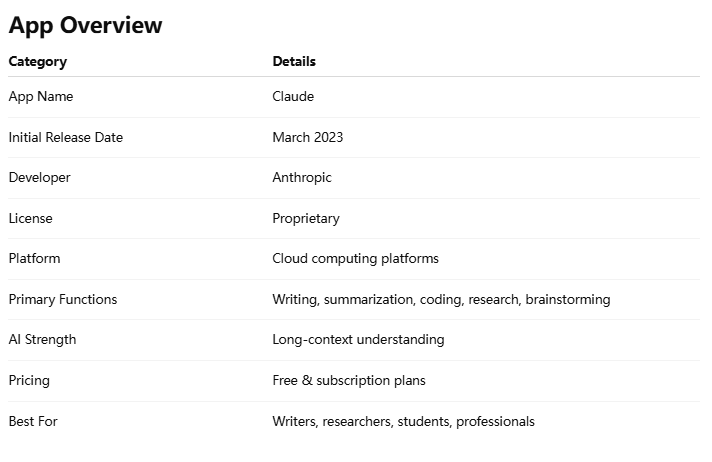
Built by Anthropic, Claude has gradually positioned itself as one of the most thoughtful AI assistants currently available. Rather than competing purely on flashy features, it focuses heavily on natural conversation, long-context understanding, and safer, more reliable responses.
Main Features:
Exceptional long-document understanding
Natural and emotionally balanced conversations
Powerful writing and summarization tools
Reliable coding and analytical assistance
Target Users: Writers, researchers, students, professionals, developers, and productivity-focused users.
The “Quiet Genius” Approach to AI
One of Claude’s most interesting qualities is that it rarely tries too hard to impress you.
Many AI assistants respond with excessive enthusiasm or overloaded formatting. Claude takes a calmer, more measured approach. Conversations feel structured, thoughtful, and surprisingly human in rhythm.
Imagine the difference between a salesperson rapidly pitching ideas and a consultant carefully listening before responding. Claude leans toward the second experience.
That tone becomes especially valuable during long sessions involving brainstorming, editing, or deep research tasks.
Reading Mountains of Information Without Losing the Plot
The Standout Feature: Long-Context Understanding
If there is one feature that truly defines Claude, it is its impressive ability to process massive amounts of text without losing context.
Uploading lengthy PDFs, meeting transcripts, research papers, or technical documentation feels less like feeding data into software and more like handing notes to a highly attentive assistant.
Summarize 100-page reports in minutes
Compare multiple documents for inconsistencies
Extract action points from meetings
Simplify difficult technical material
More importantly, Claude maintains consistency across extended conversations remarkably well. It rarely forgets earlier context, which becomes a major advantage for research-heavy workflows.
Writing Assistance That Feels Surprisingly Human
AI writing tools are everywhere now, but many still generate content that feels overly polished in an artificial way. Claude generally performs better than average here.
A Strong Sense of Tone and Structure
Whether drafting blog posts, emails, scripts, or study notes, Claude adapts tone naturally without sounding robotic.
One subtle strength is its ability to preserve nuance. Instead of flattening everything into generic corporate language, Claude often keeps the original personality and intent intact.
Editing rough drafts
Improving readability
Brainstorming content ideas
Organizing complex thoughts
Writers who already have a distinct voice will likely appreciate this balance. Claude tends to assist rather than overpower the creative process.
Clean Design, Smooth Experience
From a user experience perspective, Claude follows a minimalist philosophy.
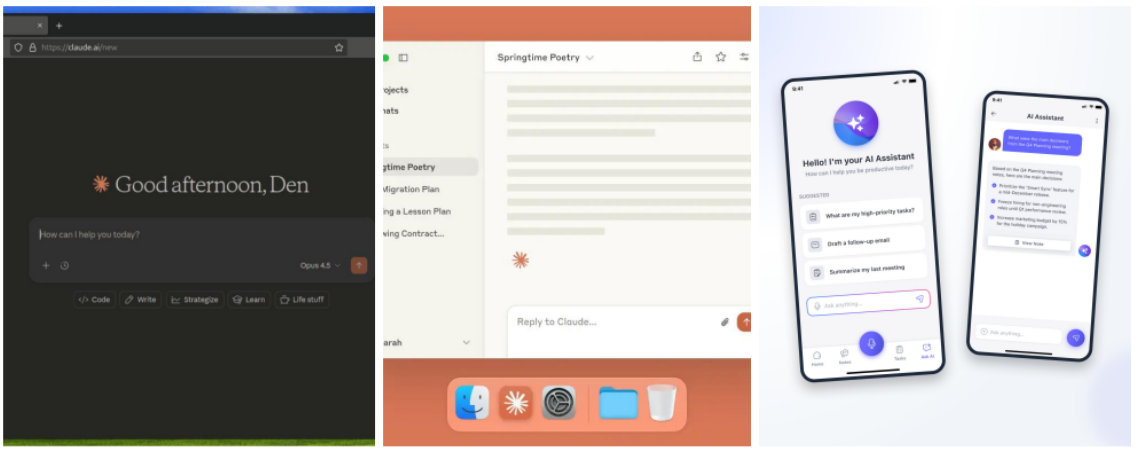
The interface is clean, distraction-free, and intentionally simple. There are very few unnecessary animations or cluttered menus.
Interface & Performance
Long conversations remain readable and organized. Uploading files is straightforward, and responses generally arrive quickly, even during complex tasks.
Learning Curve
One of Claude’s biggest advantages is accessibility. Beginners can start using it effectively within minutes, while advanced users can still create highly detailed workflows through layered prompting.
What Makes Claude Different?
1. Thoughtful Conversation Style
Claude feels less reactive and more reflective than many competing AI assistants. Responses are balanced, organized, and less likely to sound overly confident.
2. Reliable Long-Form Context
Many AI tools advertise large context windows, but Claude consistently handles long discussions and document-heavy workflows better than most mainstream alternatives.
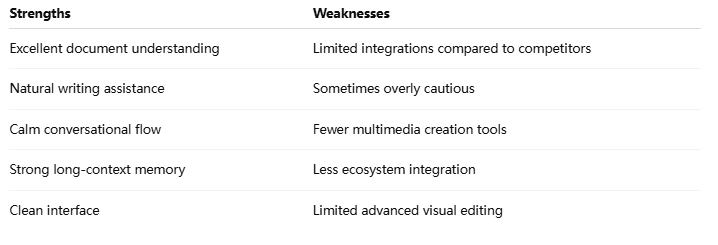
Areas That Could Be Improved
What Users Say about Claude ?
⭐⭐⭐⭐⭐
Emily Carter — Content Strategist
“The Artifacts feature is a total game-changer for my workflow. Instead of the constant 'alt-tab' dance between my IDE and the chat, Claude renders my React components live in the sidebar. Its logical integrity during complex refactoring is unmatched—it is the only AI that truly 'gets' my architectural intent.”
⭐⭐⭐⭐☆
Jason Miller — Software Engineer
“Its 200k context window is the gold standard for my literature reviews. I can feed it multiple dense PDFs, and it cross-references them without losing the plot or hallucinating facts. My only gripe is the occasional 'over-cautiousness' on sensitive topics, but as a reasoning partner, it is indispensable.”
⭐⭐⭐⭐⭐
Sophia Nguyen — Graduate Student
“As a student working with research papers every day, Claude saves me a huge amount of time. I especially like how well it summarizes complex academic material without oversimplifying it. The interface is clean, easy to use, and not overwhelming. It feels more like studying with an intelligent assistant than using a chatbot.”
Should You Use Claude?
Claude may not be the loudest AI assistant on the market, but it is arguably one of the most comfortable to use over long periods of time.
Its greatest strengths come from consistency rather than gimmicks:
Excellent document understanding
Natural writing assistance
Calm conversational flow
Strong long-context memory
For writers, researchers, students, analysts, and professionals who work primarily with information and text, Claude is easy to recommend.
Recommendation Level
★★★★☆ 4.5/5
Best For: Writing, research, brainstorming, document analysis, productivity workflows.
Less Ideal For: Heavy multimedia creation and advanced visual editing tasks.
In many ways, Claude feels less like a futuristic gadget and more like a dependable thinking companion — and that may ultimately be its most valuable feature.
Reviewed from the perspective of long-term daily usage, focusing on productivity, writing, and real-world workflow integration.