Google App : The "Front Door" to Google's AI Universe
When people talk about Google, they often think of search. But in 2026, the Google App has quietly evolved into something much bigger: a personalized information hub, an AI assistant, a news curator, and even a productivity companion rolled into one. For many users, opening the Google App feels less like launching a search tool and more like stepping into a digital control center that already knows what matters to you. Whether you’re checking the weather during breakfast, tracking a football score on the train, or asking Gemini to summarize a long article before work, the app aims to reduce the small frictions of everyday digital life. But does it actually make life easier, or is it becoming too dependent on user data and AI predictions? After several weeks of daily use across Android and iPhone, here’s a closer look.
More Than Search: Google’s Strategic Position in Mobile AI
The Google App remains one of the most installed mobile apps in the world, largely because it acts as the gateway to Google’s broader ecosystem: Search, Maps, YouTube, Gmail, Calendar, and now Gemini AI.
Unlike standalone AI assistants or traditional browsers, the app tries to blend three experiences together:
- Instant information retrieval
- Personalized content discovery
- AI-powered assistance
That combination is what makes the app unique. It’s less about typing keywords and more about anticipating intent.
In many ways, the Google App now behaves like a “smart concierge.” Sometimes that feels incredibly convenient. Other times, it raises fair questions about privacy and algorithmic influence.
A Clean Interface That Rarely Gets in Your Way

One of the app’s strongest qualities is restraint.
The interface remains visually lightweight despite packing in a huge number of services. The home screen is dominated by the familiar search bar, voice search shortcut, and personalized Discover feed below. Animations are smooth, transitions are subtle, and navigation rarely feels cluttered.
Compared with some modern “super apps,” Google avoids overwhelming users with aggressive banners or crowded menus. That simplicity matters because the app is opened dozens of times a day for quick interactions.
The Discover feed especially benefits from this design philosophy. Articles, sports scores, stock updates, and trending topics are presented almost like magazine cards, easy to skim while waiting in line for coffee or commuting home.
Voice interaction also deserves praise. Search queries through voice recognition are fast and surprisingly accurate even in noisy environments, making hands-free searching genuinely practical rather than gimmicky.
That said, personalization can occasionally become repetitive. After prolonged use, the feed sometimes circles around the same topics too aggressively, creating a mild “echo chamber” effect.
The Two Features That Truly Define the Google App
Discover Feed: Surprisingly Addictive Information Curation
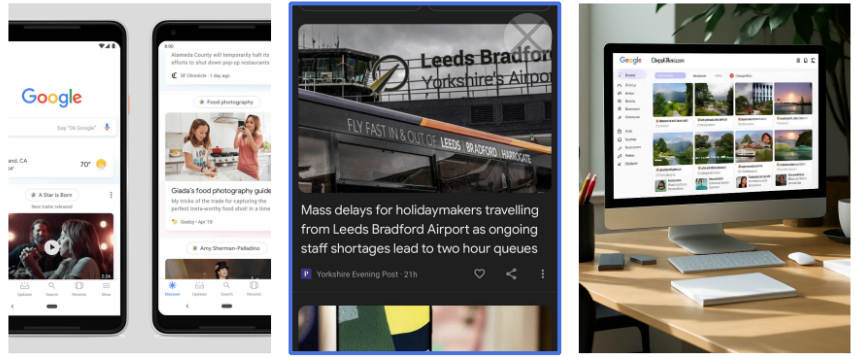
The Discover feed is arguably the app’s most underestimated feature.
Instead of waiting for users to search manually, Discover proactively surfaces content based on browsing habits, interests, location, and engagement patterns. In practice, it feels a bit like having a personalized digital newspaper that updates every few minutes.
During testing, the feed performed especially well in:
- Sports updates
- Tech news
- Travel recommendations
- Financial headlines
- Local weather and events
What makes Discover effective is its balance between relevance and speed. You often get useful information before actively searching for it.
For example, searching for hiking trails once may lead to future recommendations about outdoor gear reviews, nearby parks, and weather alerts. Sometimes that predictive behavior feels genuinely helpful.
However, Discover is only as good as Google’s understanding of your habits. If your interests shift frequently, the algorithm may need time to adapt.
Gemini Integration Changes How Search Feels
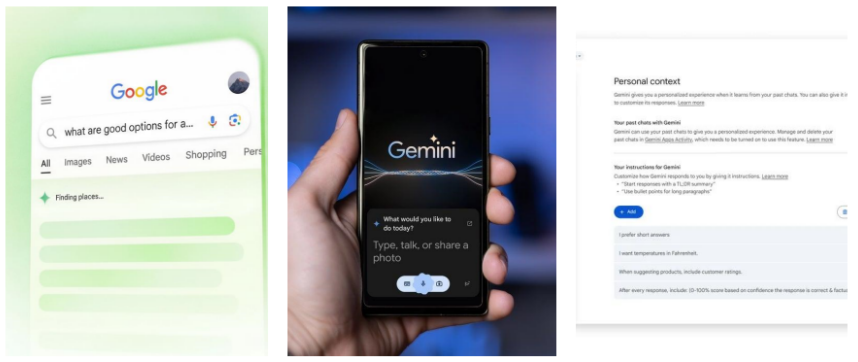
The deepest transformation inside the Google App is undoubtedly the integration of Google Gemini.
Traditional search gives you links. Gemini increasingly gives you synthesized answers.
This changes the rhythm of using the app. Instead of opening multiple tabs and piecing together information manually, users can ask broader conversational questions such as:
- “Summarize today’s AI news.”
- “Plan a three-day Seoul itinerary.”
- “Explain this article in simpler language.”
The responses are usually fast, readable, and context-aware.
What stands out most is continuity. Gemini remembers conversational context better than classic search, making follow-up questions feel natural. It brings the app closer to an actual assistant rather than a search engine.
Still, AI summaries are not perfect. Complex or highly specialized topics occasionally produce oversimplified answers, so cross-checking important information remains necessary.
Offline Features and Widgets Quietly Improve Daily Convenience
Another underrated strength is the app’s lightweight ecosystem support.
Offline functionality has improved noticeably. Previously visited pages load more reliably without internet access, and voice search caching is smarter than before.
Meanwhile, Android widgets remain among the best in the productivity category:
- Search bar widget
- Weather snapshot
- Sports score cards
- Stock tracking
- Quick voice commands
These widgets reduce the need to constantly open the full app, which subtly improves everyday usability.
Cross-platform consistency is also impressive. While Android naturally offers deeper integration, the iOS version performs surprisingly smoothly and retains most core experiences without feeling like a stripped-down port.
Privacy: Convenient, but Not Invisible
No review of the Google App would be complete without discussing privacy.
The app collects significant behavioral data to power personalization. Search history, voice activity, location signals, and engagement metrics all contribute to the experience.
To Google’s credit, account controls are clearer than they were several years ago. Users can:
- Delete search history automatically
- Manage ad personalization
- Review activity timelines
- Control microphone permissions
Still, the trade-off is obvious: the smarter the app becomes, the more data it relies on.
Users deeply concerned about digital privacy may find this level of ecosystem integration uncomfortable, even if the controls themselves are relatively transparent.
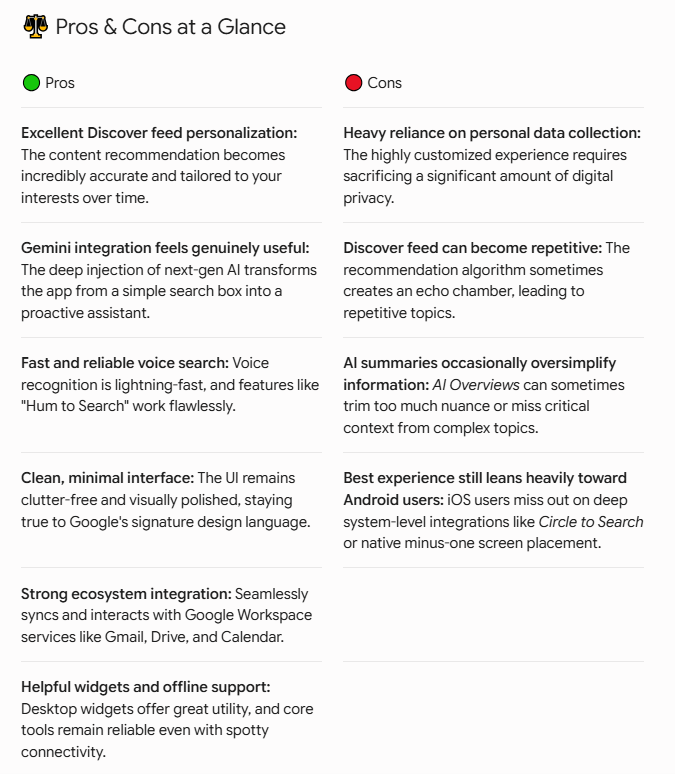
Pros & Cons at a Glance
Final Verdict: Who Should Use the Google App?
The Google App is no longer just a search companion. It has evolved into a centralized AI-powered information layer that sits between users and the internet itself.
For Android users especially, it’s difficult to ignore how seamlessly the app fits into daily routines. The combination of Discover and Gemini creates an experience that feels proactive rather than reactive — less “searching for information” and more “having information delivered intelligently.”
At the same time, users who value maximum privacy or prefer manual control over recommendations may feel hesitant about how deeply personalized the app has become.
Recommended For
- Android users deeply invested in Google services
- Users who enjoy AI-assisted search and summaries
- People who consume news, sports, and trending information daily
- Busy professionals wanting faster information access
Less Suitable For
- Privacy-first users
- Those who dislike algorithm-driven recommendations
- Users preferring traditional web browsing experiences
Final Score:
The Google App succeeds because it makes complex technology feel invisible. Its best features — especially Discover and Gemini integration — rarely scream for attention. Instead, they quietly save time throughout the day, which may be the most valuable feature any modern app can offer.