Microsoft Outlook App: The Productivity-Focused Email Giant
In the crowded world of email and productivity apps, Microsoft Outlook continues to stand as one of the most trusted and business-oriented communication platforms available today. Developed by Microsoft, Outlook has evolved far beyond a simple email client into a complete productivity ecosystem that combines email, calendar, contacts, scheduling, cloud file integration, and collaboration tools. For professionals, students, enterprise teams, and even casual users managing multiple accounts, Outlook delivers a polished experience that prioritizes organization, efficiency, and cross-platform synchronization. Unlike lightweight email apps focused purely on messaging, Outlook feels like a digital command center — one designed to keep both personal and professional life under control.
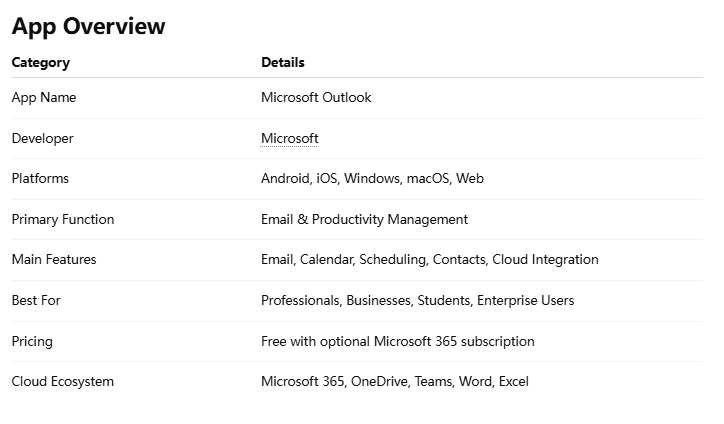
Microsoft Outlook Features
1. Unified Email Management
Outlook supports multiple email providers in one centralized inbox, including:
- Outlook.com
- Gmail
- Yahoo Mail
- iCloud
- Exchange
- IMAP/POP accounts
This flexibility makes it ideal for users juggling personal and work accounts simultaneously.
The app’s “Focused Inbox” intelligently separates important emails from less relevant messages using AI-driven prioritization. While not perfect, it significantly reduces inbox clutter for high-volume users.
2. Integrated Calendar & Scheduling
One of Outlook’s biggest strengths is its deeply integrated calendar system.
Users can:
- Schedule meetings
- Share calendars
- Create reminders
- Set recurring events
- Send meeting invitations
- View multiple time zones
For business users, Outlook’s scheduling assistant is extremely useful when coordinating meetings across teams and regions.
The seamless connection between email and calendar also allows users to turn emails directly into events or reminders.
3. Microsoft 365 Ecosystem Integration
Outlook becomes dramatically more powerful when paired with the broader Microsoft 365 ecosystem.
The app integrates smoothly with:
- Microsoft Teams
- Microsoft Word
- Microsoft Excel
- Microsoft OneDrive
- Microsoft To Do
Attachments from OneDrive are especially convenient, allowing users to send cloud links instead of bulky files.
4. Smart Search & AI Assistance
Outlook’s search capabilities are among the best in the email category.
Users can quickly locate:
- Old attachments
- Specific conversations
- Contact history
- Calendar events
- Keywords inside emails
Microsoft has also introduced AI-powered features such as:
- Suggested replies
- Smart reminders
- Meeting insights
- Automatic travel/event extraction
These features save time without feeling overly intrusive.
5. Security & Enterprise Reliability
Security is a major selling point for Outlook, especially in corporate environments.
Key protections include:
- Multi-factor authentication
- Spam filtering
- Anti-phishing protection
- Encryption support
- Enterprise-grade compliance tools
Outlook also benefits from Microsoft’s massive global cloud infrastructure, resulting in excellent uptime and synchronization reliability.
For businesses handling sensitive communication, Outlook remains one of the safest mainstream email platforms.
6. Cross-Platform Synchronization
Outlook works remarkably well across:
- Smartphones
- Tablets
- PCs
- Macs
- Web browsers
Changes sync almost instantly, including:
- Read status
- Calendar updates
- Drafts
- Attachments
- Contacts
This consistency is crucial for users constantly switching between devices throughout the day.
Microsoft Outlook User Experience
Outlook’s interface balances professionalism with modern usability.
Strengths:
- Clean layout
- Smooth navigation
- Fast email triage
- Gesture controls on mobile
- Powerful organization tools
Weaknesses:
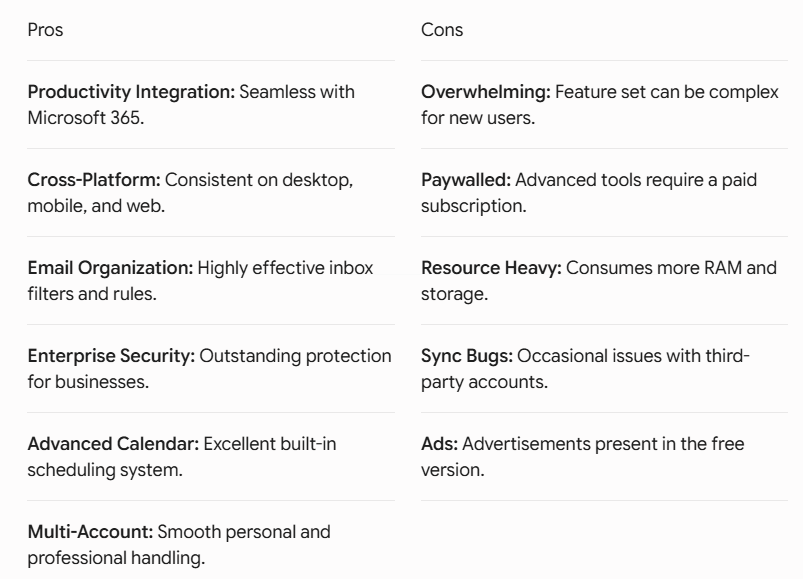
- Feature density may overwhelm casual users
- Some advanced settings are buried in menus
- Occasional sync delays with third-party accounts
Compared to simpler competitors, Outlook prioritizes functionality over minimalism — which business users will likely appreciate.
Microsoft Outlook Performance
In daily use, Outlook performs reliably across platforms.
The app handles:
- Large inboxes
- Heavy attachments
- Corporate accounts
- Multiple calendars
without major slowdowns.
Battery optimization on mobile devices has also improved considerably in recent years.
However, some users may notice:
- Slight lag on older devices
- Large cache storage usage
- Periodic notification inconsistencies
Still, overall performance remains excellent for such a feature-rich platform.
Microsoft Outlook Pros and Cons
Microsoft Outlook FAQ
Is Microsoft Outlook free?
Yes. Outlook offers a free version with core email and calendar functionality. Premium features are included with a Microsoft 365 subscription.
Can Outlook manage Gmail accounts?
Yes. Outlook supports Gmail integration along with many other email providers.
Is Outlook good for business use?
Absolutely. Outlook remains one of the most widely used enterprise email platforms worldwide.
Does Outlook work offline?
Yes. Desktop versions support offline email access and synchronization.
Is Outlook safer than other email apps?
Outlook provides strong security protections, especially for business and enterprise users.
Can Outlook integrate with Teams meetings?
Yes. Users can schedule and join Microsoft Teams meetings directly within Outlook calendars.
Terms of Service Summary
Users of Microsoft Services Agreement should understand several key policies before using Outlook.
Account Usage
Users are responsible for maintaining secure credentials and complying with Microsoft’s acceptable use policies.
Data Collection
Microsoft may collect:
- Usage analytics
- Diagnostic information
- Device data
- Account activity
This information helps improve service performance and security.
Content Responsibility
Users retain ownership of their emails and uploaded content, but Microsoft may process data to provide cloud-based functionality and spam filtering.
Prohibited Activities
The platform prohibits:
- Spam distribution
- Malware sharing
- Fraudulent behavior
- Illegal content transmission
- Unauthorized account access
Violations may result in account suspension.
Subscription Billing
Microsoft 365 subscriptions automatically renew unless canceled before the billing cycle ends.
Privacy & Security
Outlook operates under Microsoft’s broader privacy and compliance framework, including enterprise-grade encryption and regional data protection standards.
Final Verdict
Microsoft Outlook remains one of the most complete productivity-focused email applications on the market.
Its deep integration with the Microsoft ecosystem, advanced organizational tools, powerful scheduling features, and enterprise-grade reliability make it especially appealing for professionals and business users.
While casual users may find the interface slightly more complex than minimalist competitors, Outlook rewards power users with exceptional flexibility and efficiency.