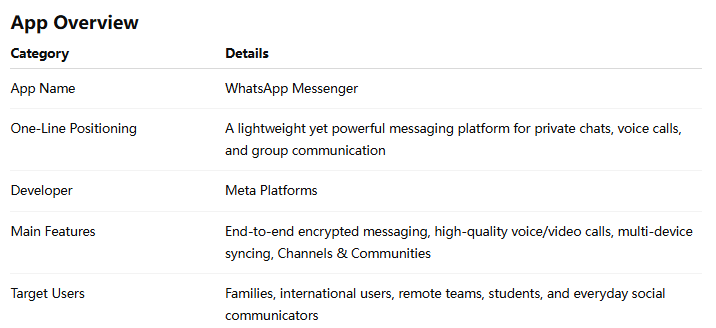
WhatsApp Messenger Review: The Digital Living Room in Your Pocket
In a world where communication apps compete like crowded cafés on a busy street, WhatsApp Messenger feels less like a flashy new venue and more like the neighborhood spot everyone quietly relies on. Whether you are sharing family photos, coordinating work discussions, or making international calls without worrying about phone bills, WhatsApp has become a surprisingly invisible part of daily life — and that invisibility is actually one of its greatest strengths.
Developed by Meta Platforms, WhatsApp focuses on simple, reliable communication rather than overwhelming users with excessive social features. After spending significant time testing its messaging, calling, privacy, and multi-device capabilities, it becomes clear why the app remains one of the world’s most widely used communication platforms.
Why WhatsApp Feels Like "Digital Plumbing"
Good communication tools often disappear into the background. Much like electricity or running water, the best apps are the ones you stop noticing because they simply work.
That is exactly the experience WhatsApp aims to create.
Unlike some social-first messaging platforms that constantly encourage content creation or public engagement, WhatsApp keeps the focus firmly on direct communication. Open the app, send a message, make a call, share a file — done. The minimal friction is refreshing.
For users with family members overseas, this simplicity becomes especially valuable. During testing, international voice calls remained stable even on average mobile networks, and message synchronization across devices felt reliable without requiring constant setup adjustments.
Messaging That Prioritizes Privacy and Speed
One of WhatsApp’s standout features is its end-to-end encryption, which protects personal conversations by ensuring only participants can read messages.
Instead of treating privacy as a hidden technical detail, WhatsApp quietly builds it into the foundation of the app. This approach helps create a sense of trust that many users now expect from modern communication tools.
What Works Well
- Fast text delivery even on weaker connections
- Smooth media sharing for photos, videos, and documents
- Reliable voice notes with clear playback controls
- Searchable chat history that remains easy to navigate
The voice messaging experience deserves special mention. WhatsApp has turned voice notes into something remarkably practical. The ability to pause recordings, adjust playback speed, and continue listening while multitasking makes them feel more polished than traditional voicemail systems.
In real-world usage, voice notes become particularly useful during commutes, cooking sessions, or quick work updates where typing feels inconvenient.
The Real Star: Cross-Platform Communication
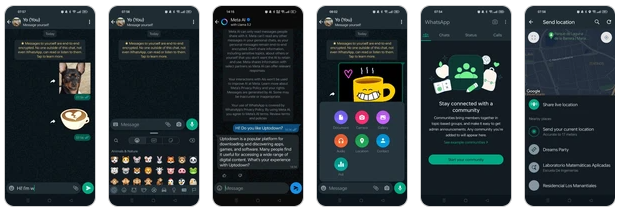
If there is one feature that truly separates WhatsApp from many competitors in the messaging app category, it is the balance between simplicity and multi-device flexibility.
Users can seamlessly move between smartphones, desktops, tablets, and web browsers without dramatically changing workflows. This may sound ordinary today, but achieving smooth synchronization while maintaining encryption remains technically impressive.
Multi-Device Support Feels Mature
WhatsApp Web and desktop applications no longer feel like secondary companions. Messages sync quickly, notifications stay consistent, and file transfers remain dependable.
For remote workers or students, this creates a practical ecosystem:
- Reply to messages on a laptop during work hours
- Continue conversations on mobile while traveling
- Join video calls without complicated setup processes
The transition between devices feels natural rather than forced.
That convenience becomes even more noticeable when compared to older messaging systems that still heavily depend on a single primary device.
Communities, Channels, and Group Communication
Another increasingly important feature is WhatsApp’s evolution beyond one-on-one messaging.
The introduction of Communities and Channels gives the platform a more organized structure for schools, clubs, workplaces, and public updates.
Unlike noisy social feeds filled with algorithm-driven distractions, WhatsApp Channels maintain a cleaner experience focused mainly on updates and announcements.
This design choice helps the app preserve its identity as a communication tool rather than transforming fully into a social media platform.
Group Chats Stay Surprisingly Manageable
Large group chats can easily become chaotic in many apps, but WhatsApp handles organization relatively well through:
- Admin controls
- Message reactions
- Polls
- Mention tagging
- Media organization
The interface avoids feeling overloaded despite the growing number of features.
User Experience: Familiar Within Minutes
WhatsApp’s interface design follows a philosophy that many modern apps sometimes forget: consistency matters more than visual experimentation.
Interface Design
The layout is clean, predictable, and easy to understand. Chats, calls, updates, and communities are clearly separated without burying essential tools behind complicated menus.
Even first-time users can usually understand the basics within minutes.
Performance and Fluidity
During testing across both Android and iOS devices, the app remained lightweight and responsive:
- Fast app launches
- Stable video calls
- Minimal lag in chat loading
- Efficient battery consumption
This efficiency is especially important in regions where users rely on older smartphones or inconsistent network conditions.
Learning Curve
WhatsApp has one of the lowest learning curves among modern communication apps. Most features are discoverable naturally through usage rather than tutorials.
That accessibility contributes significantly to its global popularity.
Ratings and reviews
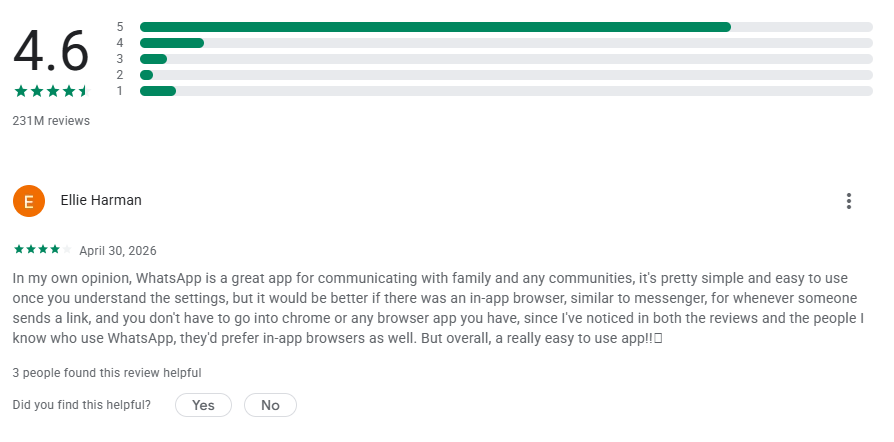
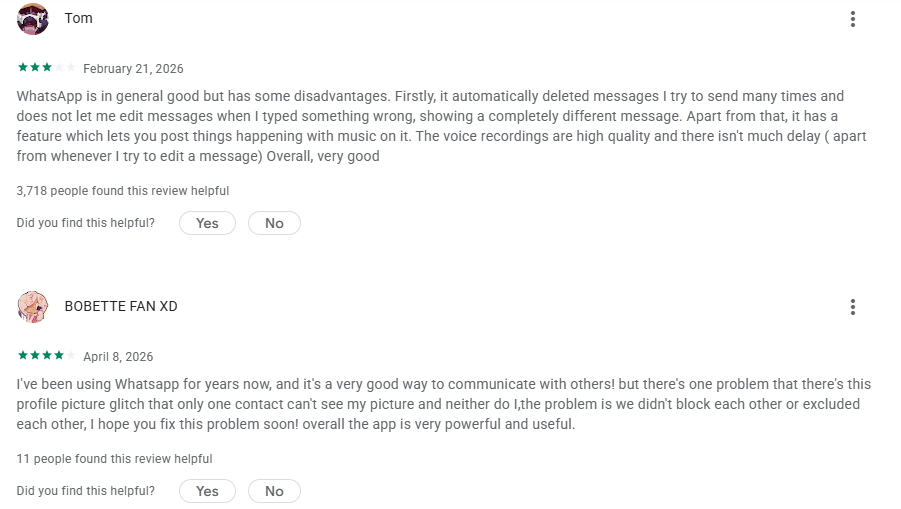
Where WhatsApp Still Has Room to Improve
Despite its strengths, WhatsApp is not without limitations.
Areas That Could Be Better
File organization remains basic.
Finding older shared documents or media can sometimes feel cumbersome compared to more productivity-focused platforms.
Backup management could be clearer.
Cloud backup settings occasionally create confusion for less technical users, especially when switching devices.
Desktop productivity tools lag behind business-focused competitors.
Apps like Slack or Telegram still offer stronger advanced workflow customization for power users.
Additionally, some users may prefer greater control over interface personalization and notification management.
Final Verdict: A Calm, Reliable Communication Tool
WhatsApp Messenger succeeds because it avoids trying to become everything at once.
Instead of overwhelming users with endless entertainment features, it focuses on dependable communication, strong privacy protection, and broad accessibility. Its voice messaging system and mature multi-device support stand out as the app’s most practical and distinctive strengths.
Best For:
- International communication
- Family and friend groups
- Everyday messaging
- Lightweight work coordination
- Users who value simplicity and reliability
Less Ideal For:
- Advanced team collaboration workflows
- Heavy customization enthusiasts
- Users seeking large public social communities
For most people, WhatsApp is not necessarily the most exciting app on their phone — but it may quietly become one of the most essential.